
技术路线
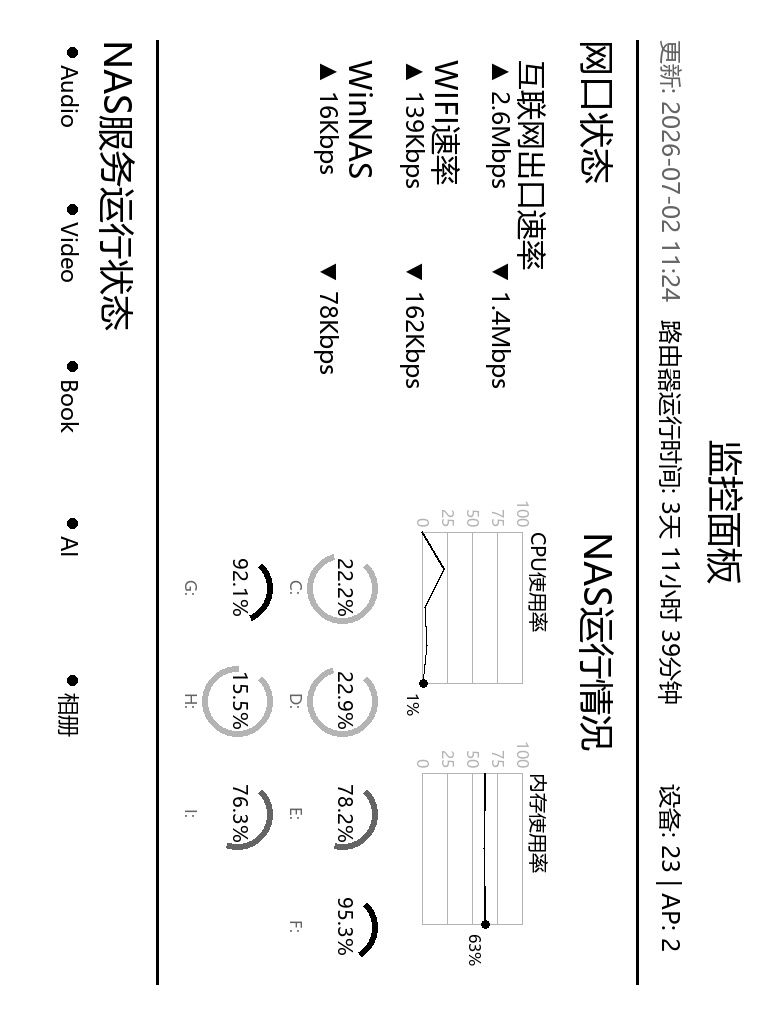
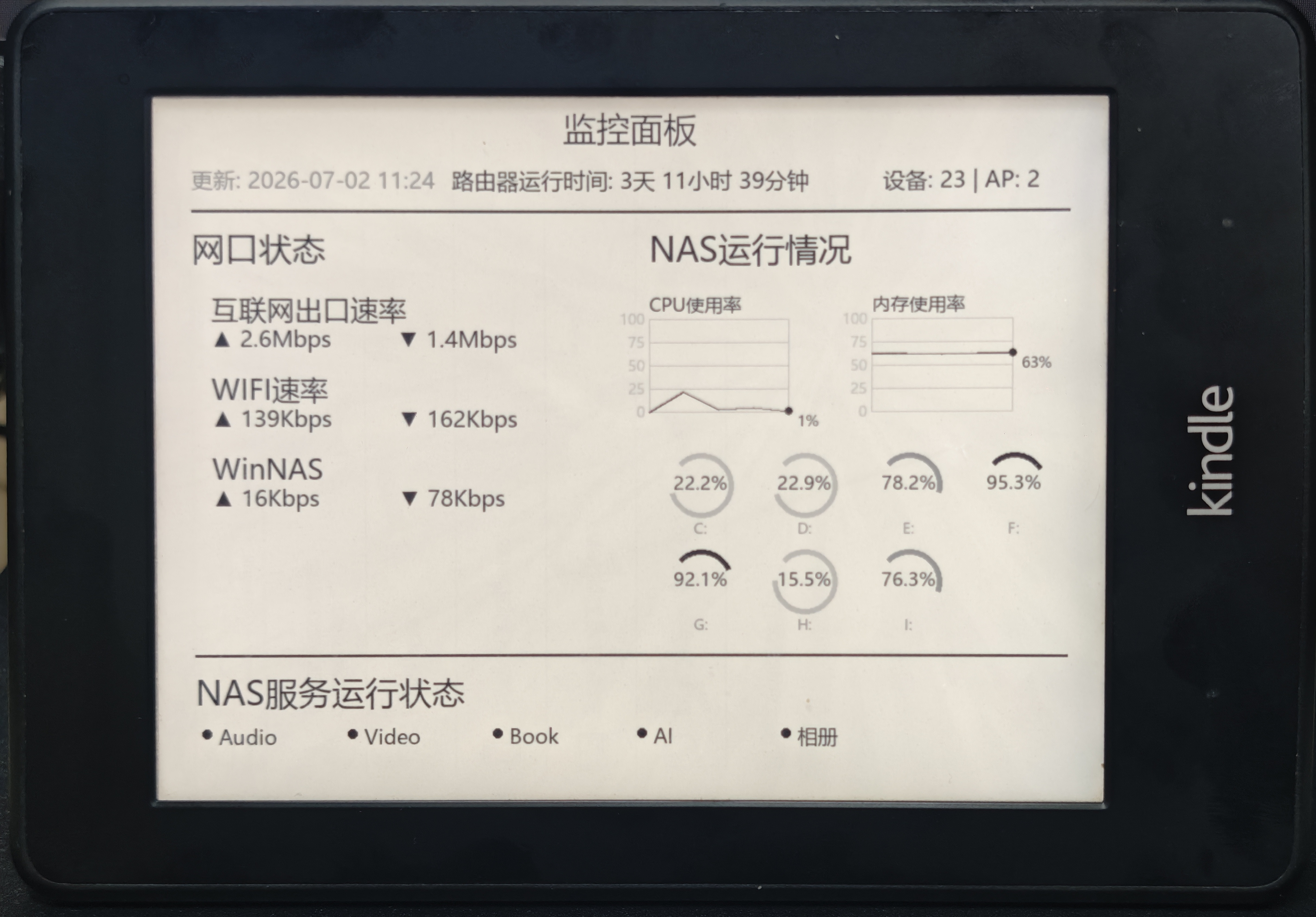
通过脚本登录路由器采集数据和采集NAS数据,定时生成图片后推送到Kindle,强制刷新屏幕进行显示。
Kindle越狱
吃灰的Kindle是Kindle Paperwhite2,如果不清楚型号可以用这个网站查询:https://bookfere.com/post/200.html
确认型号和固件版本之后,参照这篇文章进行越狱:https://bookfere.com/post/970.html
其他型号和固件版本可以在这个网站找一下。
WinterBreak和WinterBreak2我都试了一下,没有成功,参照上述网站成功越狱。
插件安装
越狱之后需要安装几个插件来完成通过推送。
参照 https://bookfere.com/post/311.html 安装MobileRead Package Installer (MRPI) — 插件安装器、KUAL — 插件程序启动器
参照https://bookfere.com/post/59.html 安装USBNetwork Hack,并完成公私钥的配置。
脚本编写
AI coding的,主要是登录路由器获取网络信息,通过python库获取NAS各方面状况,最后绘制图片,具体脚本如下:
#!/usr/bin/env python3
# -*- coding: utf-8 -*-
"""
Kindle家庭运维面板
一键获取监控数据并生成Kindle显示图片

使用方法:
    python kindle_monitor.py              # 运行一次并生成图片
    python kindle_monitor.py --loop       # 持续运行,每2分钟生成图片
    python kindle_monitor.py --json       # 同时输出JSON数据
"""

import sys
import io
import json
import argparse
import math
import time
import subprocess
from datetime import datetime
from PIL import Image, ImageDraw, ImageFont

# 设置输出编码
if sys.platform == 'win32':
    sys.stdout = io.TextIOWrapper(sys.stdout.buffer, encoding='utf-8')

# 导入监控模块
from router_monitor import RouterMonitor, LocalMonitor
from system_monitor import get_monitor

# Kindle 配置
KINDLE_IP = "192.168.5.100"  # 请修改为你的Kindle IP地址
KINDLE_USER = "root"
KINDLE_KEY = "kindlekey"
KINDLE_REMOTE_PATH = "/mnt/us/kindle_display_landscape.png"
KINDLE_LOCAL_IMAGE = "kindle_display_landscape.png"

# Kindle 分辨率
KINDLE_WIDTH = 1024
KINDLE_HEIGHT = 768

# 颜色定义
WHITE = 255
BLACK = 0
GRAY = 180
DARK_GRAY = 100


def push_to_kindle():
    """推送图片到Kindle"""
    try:
        cmd = [
            "scp",
            "-i", KINDLE_KEY,
            "-o", "StrictHostKeyChecking=no",
            KINDLE_LOCAL_IMAGE,
            f"{KINDLE_USER}@{KINDLE_IP}:{KINDLE_REMOTE_PATH}"
        ]
        result = subprocess.run(cmd, capture_output=True, text=True, timeout=30)
        if result.returncode == 0:
            print("✓ 图片已推送到Kindle")
            return True
        else:
            print(f"✗ 推送失败: {result.stderr}")
            return False
    except Exception as e:
        print(f"✗ 推送异常: {e}")
        return False


def refresh_kindle_screen():
    """刷新Kindle屏幕"""
    try:
        cmd = [
            "ssh",
            "-i", KINDLE_KEY,
            "-o", "StrictHostKeyChecking=no",
            f"{KINDLE_USER}@{KINDLE_IP}",
            "eips -g /mnt/us/kindle_display_landscape.png"
        ]
        result = subprocess.run(cmd, capture_output=True, text=True, timeout=30)
        if result.returncode == 0:
            print("✓ Kindle屏幕已刷新")
            return True
        else:
            print(f"✗ 刷新失败: {result.stderr}")
            return False
    except Exception as e:
        print(f"✗ 刷新异常: {e}")
        return False


def draw_rounded_rect(draw, xy, radius, fill=None, outline=None, width=1):
    """绘制圆角矩形"""
    x1, y1, x2, y2 = xy

    # 确保坐标有效
    if x2 <= x1 or y2 <= y1:
        return

    # 限制radius不能超过矩形尺寸的一半
    max_radius = min((x2 - x1) // 2, (y2 - y1) // 2)
    radius = min(radius, max_radius)

    if radius < 1:
        draw.rectangle(xy, fill=fill, outline=outline, width=width)
        return

    draw.rectangle([(x1+radius, y1), (x2-radius, y2)], fill=fill, outline=None)
    draw.rectangle([(x1, y1+radius), (x2, y2-radius)], fill=fill, outline=None)
    draw.pieslice([(x1, y1), (x1+2*radius, y1+2*radius)], 180, 270, fill=fill)
    draw.pieslice([(x2-2*radius, y1), (x2, y1+2*radius)], 270, 360, fill=fill)
    draw.pieslice([(x1, y2-2*radius), (x1+2*radius, y2)], 90, 180, fill=fill)
    draw.pieslice([(x2-2*radius, y2-2*radius), (x2, y2)], 0, 90, fill=fill)
    if outline:
        draw.arc([(x1, y1), (x1+2*radius, y1+2*radius)], 180, 270, fill=outline, width=width)
        draw.arc([(x2-2*radius, y1), (x2, y1+2*radius)], 270, 360, fill=outline, width=width)
        draw.arc([(x1, y2-2*radius), (x1+2*radius, y2)], 90, 180, fill=outline, width=width)
        draw.arc([(x2-2*radius, y2-2*radius), (x2, y2)], 0, 90, fill=outline, width=width)
        draw.line([(x1+radius, y1), (x2-radius, y1)], fill=outline, width=width)
        draw.line([(x1+radius, y2), (x2-radius, y2)], fill=outline, width=width)
        draw.line([(x1, y1+radius), (x1, y2-radius)], fill=outline, width=width)
        draw.line([(x2, y1+radius), (x2, y2-radius)], fill=outline, width=width)


def draw_usage_block(draw, x, y, width, height, percent, label, font_label, font_percent):
    """绘制使用率方块"""
    # 标签
    draw.text((x + width // 2, y), label, fill=BLACK, font=font_label, anchor="mt")

    # 外框(圆角矩形)
    block_y = y + 35
    block_height = height - 70
    draw_rounded_rect(draw, (x, block_y, x + width, block_y + block_height),
                      radius=10, outline=BLACK, width=3)

    # 填充(根据百分比)
    fill_width = int((width - 6) * percent / 100)
    if fill_width > 0:
        # 渐变效果:根据百分比调整灰度
        if percent < 60:
            fill_color = 180  # 浅灰
        elif percent < 85:
            fill_color = 100  # 中灰
        else:
            fill_color = BLACK  # 黑色(警告)

        draw_rounded_rect(draw, (x + 3, block_y + 3, x + 3 + fill_width, block_y + block_height - 3),
                          radius=8, fill=fill_color)

    # 百分比数字(大字)
    percent_y = block_y + block_height // 2
    draw.text((x + width // 2, percent_y), f"{percent}%", fill=BLACK, font=font_percent, anchor="mm")


def draw_line_chart(draw, x, y, width, height, data, label, font_label, font_axis, max_val=100):
    """绘制折线图"""
    # 标签
    draw.text((x, y), label, fill=BLACK, font=font_label)

    chart_y = y + 30
    chart_height = height - 50
    chart_width = width - 60

    # 绘制边框
    draw.rectangle([(x, chart_y), (x + chart_width, chart_y + chart_height)], outline=GRAY, width=1)

    # 绘制网格线(水平)
    for i in range(5):
        grid_y = chart_y + int(chart_height * i / 4)
        draw.line([(x, grid_y), (x + chart_width, grid_y)], fill=GRAY, width=1)
        # Y轴标签
        val = int(max_val * (4 - i) / 4)
        draw.text((x - 5, grid_y), str(val), fill=GRAY, font=font_axis, anchor="rm")

    if not data:
        return

    # 如果只有一个数据点,显示一个点和数值
    if len(data) == 1:
        px = x + chart_width // 2
        py = chart_y + chart_height - int(chart_height * data[0] / max_val)
        draw.ellipse([(px-6, py-6), (px+6, py+6)], fill=BLACK)
        draw.text((px + 15, py), f"{int(data[0])}%", fill=BLACK, font=font_axis)
        return

    # 绘制折线
    points = []
    for i, val in enumerate(data):
        px = x + int(chart_width * i / (len(data) - 1))
        py = chart_y + chart_height - int(chart_height * val / max_val)
        points.append((px, py))

    # 绘制线条
    for i in range(len(points) - 1):
        draw.line([points[i], points[i+1]], fill=BLACK, width=2)

    # 绘制当前值点
    if points:
        last_point = points[-1]
        draw.ellipse([(last_point[0]-4, last_point[1]-4),
                      (last_point[0]+4, last_point[1]+4)], fill=BLACK)
        # 当前值文字
        draw.text((last_point[0]+10, last_point[1]), f"{int(data[-1])}%", fill=BLACK, font=font_axis)


def create_kindle_image(data):
    """创建Kindle横版显示图片"""
    img = Image.new('L', (KINDLE_WIDTH, KINDLE_HEIGHT), WHITE)
    draw = ImageDraw.Draw(img)

    # 统一字体大小
    try:
        font_title = ImageFont.truetype("msyh.ttc", 36)      # 标题
        font_large = ImageFont.truetype("msyh.ttc", 30)      # 大字
        font_medium = ImageFont.truetype("msyh.ttc", 24)     # 中字
        font_small = ImageFont.truetype("msyh.ttc", 20)      # 小字
        font_tiny = ImageFont.truetype("msyh.ttc", 16)       # 极小字
        font_percent = ImageFont.truetype("msyh.ttc", 36)    # 百分比数字
        font_service = ImageFont.truetype("msyh.ttc", 22)    # 服务状态
    except:
        try:
            font_title = ImageFont.truetype("simhei.ttf", 36)
            font_large = ImageFont.truetype("simhei.ttf", 30)
            font_medium = ImageFont.truetype("simhei.ttf", 24)
            font_small = ImageFont.truetype("simhei.ttf", 20)
            font_tiny = ImageFont.truetype("simhei.ttf", 16)
            font_percent = ImageFont.truetype("simhei.ttf", 36)
            font_service = ImageFont.truetype("simhei.ttf", 22)
        except:
            font_title = ImageFont.load_default()
            font_large = ImageFont.load_default()
            font_medium = ImageFont.load_default()
            font_small = ImageFont.load_default()
            font_tiny = ImageFont.load_default()
            font_percent = ImageFont.load_default()
            font_service = ImageFont.load_default()

    margin = 40
    y_pos = 25

    # 标题
    draw.text((KINDLE_WIDTH // 2, y_pos), "监控面板", fill=BLACK, font=font_title, anchor="mt")
    y_pos += 55

    # 获取数据
    router_data = data.get('router', {})
    local_data = data.get('local', {})
    system_data = data.get('system', {})

    # ========== 第一行:更新时间、运行时间、设备统计 ==========
    timestamp = data.get('timestamp', datetime.now().isoformat())
    time_str = datetime.fromisoformat(timestamp).strftime("%Y-%m-%d %H:%M")
    device = router_data.get('device', {})
    uptime = device.get('uptime_formatted', '未知')
    devices = router_data.get('devices', {})

    # 横向排列(两端对齐)
    draw.text((margin, y_pos), f"更新: {time_str}", fill=DARK_GRAY, font=font_medium)
    draw.text((margin + 280, y_pos), f"路由器运行时间: {uptime}", fill=BLACK, font=font_medium)
    draw.text((KINDLE_WIDTH - margin - 200, y_pos), f"设备: {devices.get('total', '?')} | AP: {devices.get('ap_count', '?')}", fill=BLACK, font=font_medium)
    y_pos += 50

    # 分隔线
    draw.line([(margin, y_pos), (KINDLE_WIDTH - margin, y_pos)], fill=BLACK, width=3)
    y_pos += 15

    # ========== 左右分栏 ==========
    left_width = KINDLE_WIDTH // 2 - margin - 20
    right_x = KINDLE_WIDTH // 2 + 20
    right_width = KINDLE_WIDTH - right_x - margin

    # 计算左右模块的高度
    left_height = 3 * 90 + 50  # 3个设备
    right_height = 180 + 150   # 折线图 + 硬盘
    module_height = max(left_height, right_height)

    # ========== 左边:网口状态 ==========
    wan = router_data.get('wan', {})
    devices_status = router_data.get('devices_status', {})

    # 网口状态标题
    draw.text((margin, y_pos), "网口状态", fill=BLACK, font=font_title)
    left_content_y = y_pos + 70  # 标题与内容间距

    # 计算每个设备的间距
    device_spacing = (module_height - 70) // 3

    # 互联网出口
    dev_y1 = left_content_y
    draw.text((margin + 20, dev_y1), "互联网出口速率", fill=BLACK, font=font_large)
    draw.text((margin + 20, dev_y1 + 35), f"▲ {wan.get('upload_rate', '?')}", fill=BLACK, font=font_medium)
    draw.text((margin + 220, dev_y1 + 35), f"▼ {wan.get('download_rate', '?')}", fill=BLACK, font=font_medium)

    # 问天BE7200 Pro+ (WIFI速率)
    dev_y2 = left_content_y + device_spacing
    wtd = devices_status.get('问天BE7200 Pro+')
    draw.text((margin + 20, dev_y2), "WIFI速率", fill=BLACK, font=font_large)
    if wtd:
        draw.text((margin + 20, dev_y2 + 35), f"▲ {wtd.get('upload_rate', '?')}", fill=BLACK, font=font_medium)
        draw.text((margin + 220, dev_y2 + 35), f"▼ {wtd.get('download_rate', '?')}", fill=BLACK, font=font_medium)
    else:
        draw.text((margin + 20, dev_y2 + 35), "离线", fill=GRAY, font=font_medium)

    # WinNAS
    dev_y3 = left_content_y + device_spacing * 2
    nas = devices_status.get('WinNAS')
    draw.text((margin + 20, dev_y3), "WinNAS", fill=BLACK, font=font_large)
    if nas:
        draw.text((margin + 20, dev_y3 + 35), f"▲ {nas.get('upload_rate', '?')}", fill=BLACK, font=font_medium)
        draw.text((margin + 220, dev_y3 + 35), f"▼ {nas.get('download_rate', '?')}", fill=BLACK, font=font_medium)
    else:
        draw.text((margin + 20, dev_y3 + 35), "离线", fill=GRAY, font=font_medium)

    # ========== 右边:本机运行情况 ==========
    cpu = local_data.get('cpu', {})
    memory = local_data.get('memory', {})
    disks = local_data.get('disks', [])

    # NAS运行情况标题
    draw.text((right_x, y_pos), "NAS运行情况", fill=BLACK, font=font_title)
    right_content_y = y_pos + 70  # 标题与内容间距

    # CPU和内存历史折线图
    history = system_data.get('history', {})
    cpu_history = history.get('cpu', [])
    memory_history = history.get('memory', [])

    chart_width = right_width // 2 - 15
    chart_height = 150

    # CPU折线图
    draw_line_chart(draw, right_x, right_content_y, chart_width, chart_height,
                    cpu_history, "CPU使用率", font_small, font_tiny)

    # 内存折线图
    draw_line_chart(draw, right_x + chart_width + 30, right_content_y, chart_width, chart_height,
                    memory_history, "内存使用率", font_small, font_tiny)

    right_content_y += chart_height + 15

    # 硬盘仪表盘(横向排列)
    disk_gauge_radius = 35
    disks_per_row = 4
    disk_spacing_x = right_width // disks_per_row

    for i, disk in enumerate(disks):
        row = i // disks_per_row
        col = i % disks_per_row

        dx = right_x + disk_spacing_x * col + disk_spacing_x // 2
        dy = right_content_y + row * (disk_gauge_radius * 2 + 35) + disk_gauge_radius + 10

        device_name = disk.get('device', '?').replace('\\', '')
        percent = disk.get('percent', 0)

        # 背景圆弧(灰色)
        draw.arc([(dx-disk_gauge_radius, dy-disk_gauge_radius), (dx+disk_gauge_radius, dy+disk_gauge_radius)],
                 start=225, end=-45, fill=GRAY, width=6)

        # 前景圆弧
        angle_range = 270
        fill_angle = angle_range * percent / 100
        end_angle = 225 - fill_angle
        if percent > 0:
            fill_color = BLACK if percent >= 85 else (100 if percent >= 60 else 180)
            draw.arc([(dx-disk_gauge_radius, dy-disk_gauge_radius), (dx+disk_gauge_radius, dy+disk_gauge_radius)],
                     start=225, end=end_angle, fill=fill_color, width=6)

        # 中心百分比文字
        draw.text((dx, dy-3), f"{percent}%", fill=BLACK, font=font_small, anchor="mm")

        # 标签文字
        draw.text((dx, dy+disk_gauge_radius+6), device_name, fill=DARK_GRAY, font=font_tiny, anchor="mt")

    # ========== 底部:服务运行状态 ==========
    services = system_data.get('services', [])

    # 计算底部位置
    disk_rows = (len(disks) + disks_per_row - 1) // disks_per_row
    bottom_y = max(left_content_y + module_height, right_content_y + disk_rows * (disk_gauge_radius * 2 + 35)) + 20

    # 分隔线
    draw.line([(margin, bottom_y), (KINDLE_WIDTH - margin, bottom_y)], fill=BLACK, width=3)
    bottom_y += 15

    # NAS服务运行状态标题
    draw.text((margin, bottom_y), "NAS服务运行状态", fill=BLACK, font=font_title)
    bottom_y += 60  # 标题与服务列表间距

    # 服务状态网格(每行6个)
    services_per_row = 6
    service_width = (KINDLE_WIDTH - 2 * margin) // services_per_row

    for i, svc in enumerate(services):
        col = i % services_per_row

        sx = margin + col * service_width
        sy = bottom_y

        # 状态指示器(圆点)
        dot_x = sx + 12
        dot_y = sy + 10
        dot_color = BLACK if svc.get('running', False) else GRAY
        draw.ellipse([(dot_x-5, dot_y-5), (dot_x+5, dot_y+5)], fill=dot_color)

        # 服务名称
        draw.text((sx + 25, sy - 2), svc.get('name', '?'), fill=BLACK, font=font_service)

    return img


def generate_and_push(router_monitor, local_monitor, system_monitor, args):
    """生成图片并推送到Kindle"""
    # 采集历史数据
    print(f"\n[{datetime.now().strftime('%H:%M:%S')}] 采集系统数据...")
    for i in range(args.sample):
        system_monitor.sample_data(force=True)
        if i < args.sample - 1:
            time.sleep(1)
    print("✓ 数据采集完成")

    # 获取所有数据
    print("获取监控数据...")
    router_data = router_monitor.get_all_data()
    local_data = local_monitor.get_all_data()
    system_data = system_monitor.get_all_data()

    # 合并数据
    data = {
        "timestamp": datetime.now().isoformat(),
        "router": router_data,
        "local": local_data,
        "system": system_data
    }

    # 生成图片
    print("生成Kindle显示图片...")
    img = create_kindle_image(data)

    # 顺时针旋转90度
    img = img.rotate(-90, expand=True)

    # 保存图片
    img.save(KINDLE_LOCAL_IMAGE)
    print(f"✓ 图片已保存: {KINDLE_LOCAL_IMAGE}")

    # 保存JSON数据
    with open('monitor_data.json', 'w', encoding='utf-8') as f:
        json.dump(data, f, indent=2, ensure_ascii=False)

    # 推送到Kindle(暂时注释掉)
    # print("推送到Kindle...")
    # if push_to_kindle():
    #     print("刷新Kindle屏幕...")
    #     refresh_kindle_screen()

    print(f"✓ 生成完成 [{datetime.now().strftime('%H:%M:%S')}]")


def main():
    """主函数"""
    parser = argparse.ArgumentParser(description='Kindle家庭运维面板')
    parser.add_argument('--json', action='store_true', help='输出JSON数据')
    parser.add_argument('--loop', action='store_true', help='持续运行模式')
    parser.add_argument('--interval', type=int, default=120, help='循环间隔(秒),默认120秒')
    parser.add_argument('--host', default='192.168.5.1', help='路由器地址')
    parser.add_argument('--user', default='admin', help='用户名')
    parser.add_argument('--password', default='jack81502', help='密码')
    parser.add_argument('--sample', type=int, default=10, help='采集数据次数(用于生成历史数据)')
    args = parser.parse_args()

    print("=" * 50)
    print("       Kindle家庭运维面板")
    print("=" * 50)

    # 创建监控实例
    print("\n[1/4] 连接路由器...")
    router_monitor = RouterMonitor(
        host=args.host,
        username=args.user,
        password=args.password
    )
    local_monitor = LocalMonitor()
    system_monitor = get_monitor()

    # 连接并登录路由器
    success, message = router_monitor.connect()
    if not success:
        print(f"错误: {message}")
        sys.exit(1)
    print("✓ 路由器连接成功")

    if args.loop:
        # 持续运行模式
        print(f"\n进入持续运行模式,每 {args.interval} 秒生成一次图片")
        print("按 Ctrl+C 停止运行")
        print("=" * 50)

        while True:
            try:
                generate_and_push(router_monitor, local_monitor, system_monitor, args)
                print(f"\n等待 {args.interval} 秒后再次生成...")
                time.sleep(args.interval)
            except KeyboardInterrupt:
                print("\n\n程序已停止")
                break
            except Exception as e:
                print(f"\n发生错误: {e}")
                print("等待 30 秒后重试...")
                time.sleep(30)
    else:
        # 单次运行模式
        generate_and_push(router_monitor, local_monitor, system_monitor, args)

        if args.json:
            print("\n" + "=" * 50)
            print("JSON数据:")
            print("=" * 50)
            data = json.load(open('monitor_data.json', 'r', encoding='utf-8'))
            print(json.dumps(data, indent=2, ensure_ascii=False))

        print("\n" + "=" * 50)
        print("完成!请将 kindle_display_landscape.png 传输到Kindle上查看")
        print("=" * 50)


if __name__ == "__main__":
    main()
#!/usr/bin/env python3
# -*- coding: utf-8 -*-
"""
家庭运维面板监控脚本
用于获取路由器网络状态和本机运行情况

支持功能:
- 路由器登录认证
- 获取路由器运行时间
- 获取网口状态(互联网出口、指定设备)
- 获取设备统计
- 获取本机CPU使用率
- 获取本机内存使用率
- 获取本机硬盘使用情况

使用方法:
    python router_monitor.py              # 运行并显示监控数据
    python router_monitor.py --json       # 输出JSON格式数据
"""

import requests
import urllib3
import json
import hashlib
import xml.etree.ElementTree as ET
import sys
import io
import argparse
import psutil
from datetime import datetime

# 禁用SSL警告
urllib3.disable_warnings(urllib3.exceptions.InsecureRequestWarning)

# 设置输出编码
if sys.platform == 'win32':
    sys.stdout = io.TextIOWrapper(sys.stdout.buffer, encoding='utf-8')


class RouterMonitor:
    """路由器监控类"""

    def __init__(self, host="192.168.5.1", username="admin", password="########"):
        self.host = host
        self.username = username
        self.password = password
        self.base_url = f"https://{host}"
        self.session = requests.Session()
        self.session.verify = False
        self.session_token = None
        self.logged_in = False

    def connect(self):
        """连接路由器并登录"""
        try:
            # 获取初始会话
            r = self.session.get(self.base_url, timeout=10)
            if r.status_code != 200:
                return False, "无法连接路由器"

            # 获取登录令牌
            token_url = "/?_type=loginsceneData&_tag=login_token_json"
            r = self.session.get(self.base_url + token_url, timeout=10)
            token_data = json.loads(r.text)
            login_token = token_data.get('logintoken', '')
            self.session_token = token_data.get('_sessionToken', '')

            # 哈希密码
            hashed_password = hashlib.sha256(
                (self.password + login_token).encode('utf-8')
            ).hexdigest()

            # 登录
            login_url = "/?_type=loginData&_tag=login_entry"
            login_data = {
                "Username": self.username,
                "Password": hashed_password,
                "action": "login",
                "Frm_Logintoken": "",
                "captchaCode": "",
                "_sessionTOKEN": self.session_token
            }

            r = self.session.post(self.base_url + login_url, data=login_data, timeout=10)
            login_result = json.loads(r.text)

            if login_result.get('loginErrType', '') != '':
                error_msg = login_result.get('loginErrMsg', '未知错误')
                return False, f"登录失败: {error_msg}"

            self.session_token = login_result.get('sess_token', self.session_token)
            self.logged_in = True
            return True, "登录成功"

        except Exception as e:
            return False, f"连接错误: {str(e)}"

    def _parse_xml_pairs(self, xml_text):
        """解析XML响应中的ParaName/ParaValue对"""
        result = {}
        try:
            if not xml_text or xml_text.strip() == '':
                return result

            root = ET.fromstring(xml_text)

            for obj_elem in root:
                if obj_elem.tag.startswith('OBJ_'):
                    obj_name = obj_elem.tag
                    instances = []

                    for instance in obj_elem.findall('Instance'):
                        instance_data = {}
                        para_names = instance.findall('ParaName')
                        para_values = instance.findall('ParaValue')

                        for name, value in zip(para_names, para_values):
                            if name.text:
                                instance_data[name.text.strip()] = \
                                    value.text.strip() if value.text else ''

                        instances.append(instance_data)

                    if len(instances) == 1:
                        result[obj_name] = instances[0]
                    else:
                        result[obj_name] = instances

        except Exception as e:
            pass

        return result

    def _format_uptime(self, seconds):
        """格式化运行时间(不显示秒)"""
        try:
            seconds = int(seconds)
            days = seconds // 86400
            hours = (seconds % 86400) // 3600
            minutes = (seconds % 3600) // 60

            parts = []
            if days > 0:
                parts.append(f"{days}天")
            if hours > 0:
                parts.append(f"{hours}小时")
            if minutes > 0:
                parts.append(f"{minutes}分钟")

            return " ".join(parts) if parts else "0分钟"
        except:
            return str(seconds)

    def get_device_info(self):
        """获取设备信息(运行时间)"""
        if not self.logged_in:
            return None

        r = self.session.get(
            self.base_url + "/?_type=hiddenData&_tag=vueinfo_data",
            timeout=10
        )
        data = self._parse_xml_pairs(r.text)
        dev_info = data.get('OBJ_DEVINFO_ID', {})

        return {
            "uptime": dev_info.get('UpTime', '0'),
            "uptime_formatted": self._format_uptime(dev_info.get('UpTime', '0'))
        }

    def get_wan_status(self):
        """获取WAN口状态"""
        if not self.logged_in:
            return None

        r = self.session.get(
            self.base_url + "/?_type=vueData&_tag=vue_home_device_data",
            timeout=10
        )
        home_data = self._parse_xml_pairs(r.text)
        home_info = home_data.get('OBJ_HOME_BASICINFO_ID', {})

        r = self.session.get(
            self.base_url + "/?_type=vueData&_tag=vue_internet_data",
            timeout=10
        )
        internet_data = self._parse_xml_pairs(r.text)
        wan_conn = internet_data.get('OBJ_ETHWANCPPP_ID', {})

        return {
            "status": home_info.get('WANStatus', '未知'),
            "speed": home_info.get('WANSpeed', '未知'),
            "upload_rate": home_info.get('WANUpRate', '未知'),
            "download_rate": home_info.get('WANDownRate', '未知'),
            "connection_type": wan_conn.get('TransType', '未知'),
            "connection_uptime": wan_conn.get('UpTime', '0'),
            "connection_uptime_formatted": self._format_uptime(wan_conn.get('UpTime', '0'))
        }

    def get_device_status(self):
        """获取指定设备的上下行状态"""
        if not self.logged_in:
            return None

        # 获取客户端数据
        r = self.session.get(
            self.base_url + "/?_type=vueData&_tag=vue_client_data",
            timeout=10
        )
        client_data = self._parse_xml_pairs(r.text)
        clients = client_data.get('OBJ_CLIENTS_ID', [])

        if not isinstance(clients, list):
            clients = [clients] if clients else []

        # 查找指定设备
        devices = {
            "问天BE7200 Pro+": None,
            "WinNAS": None
        }

        for client in clients:
            hostname = client.get('HostName', '')
            alias = client.get('AliasName', '')

            # 匹配问天BE7200 Pro+
            if '问天' in hostname or 'BE7200' in hostname:
                devices["问天BE7200 Pro+"] = {
                    "ip": client.get('IPAddress', '未知'),
                    "upload_rate": client.get('UpRate', '0bps'),
                    "download_rate": client.get('DownRate', '0bps')
                }

            # 匹配WinNAS
            if alias == 'WinNAS' or hostname == 'WinNAS':
                devices["WinNAS"] = {
                    "ip": client.get('IPAddress', '未知'),
                    "upload_rate": client.get('UpRate', '0bps'),
                    "download_rate": client.get('DownRate', '0bps')
                }

        return devices

    def get_device_count(self):
        """获取设备统计"""
        if not self.logged_in:
            return None

        r = self.session.get(
            self.base_url + "/?_type=vueData&_tag=vue_home_device_data",
            timeout=10
        )
        home_data = self._parse_xml_pairs(r.text)
        home_info = home_data.get('OBJ_HOME_BASICINFO_ID', {})

        return {
            "total": home_info.get('AccessDevNum', '0'),
            "ap_count": home_info.get('TopoAPNum', '0')
        }

    def get_all_data(self):
        """获取所有监控数据"""
        if not self.logged_in:
            return None

        device_info = self.get_device_info()
        wan_status = self.get_wan_status()
        device_status = self.get_device_status()
        device_count = self.get_device_count()

        return {
            "timestamp": datetime.now().isoformat(),
            "device": {
                "uptime": device_info.get('uptime', '0'),
                "uptime_formatted": device_info.get('uptime_formatted', '未知')
            },
            "wan": {
                "status": wan_status.get('status', '未知'),
                "speed": f"{wan_status.get('speed', '未知')} Mbps",
                "upload_rate": wan_status.get('upload_rate', '未知'),
                "download_rate": wan_status.get('download_rate', '未知'),
                "connection_type": wan_status.get('connection_type', '未知')
            },
            "devices_status": device_status,
            "devices": {
                "total": device_count.get('total', '0'),
                "ap_count": device_count.get('ap_count', '0')
            }
        }


class LocalMonitor:
    """本机监控类"""

    def get_cpu_usage(self):
        """获取CPU使用率"""
        return {
            "percent": psutil.cpu_percent(interval=1)
        }

    def get_memory_usage(self):
        """获取内存使用情况"""
        memory = psutil.virtual_memory()
        return {
            "total_gb": round(memory.total / (1024**3), 2),
            "used_gb": round(memory.used / (1024**3), 2),
            "percent": memory.percent
        }

    def get_disk_usage(self):
        """获取所有硬盘使用情况"""
        disks = []
        partitions = psutil.disk_partitions()

        for partition in partitions:
            try:
                usage = psutil.disk_usage(partition.mountpoint)
                disks.append({
                    "device": partition.device,
                    "mountpoint": partition.mountpoint,
                    "total_gb": round(usage.total / (1024**3), 2),
                    "used_gb": round(usage.used / (1024**3), 2),
                    "percent": usage.percent
                })
            except Exception:
                pass

        return disks

    def get_all_data(self):
        """获取所有本机监控数据"""
        return {
            "cpu": self.get_cpu_usage(),
            "memory": self.get_memory_usage(),
            "disks": self.get_disk_usage()
        }


def main():
    """主函数"""
    parser = argparse.ArgumentParser(description='家庭运维面板监控')
    parser.add_argument('--json', action='store_true', help='输出JSON格式')
    parser.add_argument('--host', default='192.168.5.1', help='路由器地址')
    parser.add_argument('--user', default='admin', help='用户名')
    parser.add_argument('--password', default='jack81502', help='密码')
    args = parser.parse_args()

    # 创建监控实例
    router_monitor = RouterMonitor(
        host=args.host,
        username=args.user,
        password=args.password
    )
    local_monitor = LocalMonitor()

    # 连接并登录路由器
    success, message = router_monitor.connect()
    if not success:
        print(f"错误: {message}")
        sys.exit(1)

    # 获取所有数据
    router_data = router_monitor.get_all_data()
    local_data = local_monitor.get_all_data()

    # 合并数据
    data = {
        "timestamp": datetime.now().isoformat(),
        "router": router_data,
        "local": local_data
    }

    if args.json:
        # 输出JSON
        print(json.dumps(data, indent=2, ensure_ascii=False))
    else:
        # 显示格式化输出
        print("=" * 60)
        print("              家庭运维面板 - 系统监控")
        print("=" * 60)

        # 路由器运行时间
        router_device = router_data.get('device', {})
        print(f"\n【路由器运行时间】")
        print(f"  {router_device.get('uptime_formatted', '未知')}")

        # 网口状态
        print(f"\n【网口状态】")
        print("-" * 60)

        # 互联网出口(WAN)
        wan = router_data.get('wan', {})
        print(f"  互联网出口 (WAN):")
        print(f"    状态: {wan.get('status', '未知')}")
        print(f"    协商速率: {wan.get('speed', '未知')}")
        print(f"    实时上行: {wan.get('upload_rate', '未知')}")
        print(f"    实时下行: {wan.get('download_rate', '未知')}")

        # 指定设备状态
        devices_status = router_data.get('devices_status', {})
        for dev_name in ["问天BE7200 Pro+", "WinNAS"]:
            dev = devices_status.get(dev_name)
            if dev:
                print(f"\n  {dev_name}:")
                print(f"    IP地址: {dev.get('ip', '未知')}")
                print(f"    实时上行: {dev.get('upload_rate', '未知')}")
                print(f"    实时下行: {dev.get('download_rate', '未知')}")
            else:
                print(f"\n  {dev_name}:")
                print(f"    状态: 未在线")

        # 设备统计
        devices = router_data.get('devices', {})
        print(f"\n【设备统计】")
        print(f"  总设备数: {devices.get('total', '未知')}")
        print(f"  AP数量:   {devices.get('ap_count', '未知')}")

        # 本机运行情况
        print(f"\n【本机运行情况】")
        print("-" * 60)

        # CPU使用率
        cpu = local_data.get('cpu', {})
        print(f"  CPU使用率: {cpu.get('percent', 0)}%")

        # 内存使用率
        memory = local_data.get('memory', {})
        print(f"  内存使用率: {memory.get('percent', 0)}%")
        print(f"    总内存: {memory.get('total_gb', 0)} GB")
        print(f"    已使用: {memory.get('used_gb', 0)} GB")

        # 硬盘使用情况
        disks = local_data.get('disks', [])
        print(f"  硬盘使用情况:")
        for disk in disks:
            device = disk.get('device', '未知')
            percent = disk.get('percent', 0)
            total = disk.get('total_gb', 0)
            used = disk.get('used_gb', 0)
            print(f"    {device} 使用率: {percent}% ({used}/{total} GB)")

        print("\n" + "=" * 60)


if __name__ == "__main__":
    main()
#!/usr/bin/env python3
# -*- coding: utf-8 -*-
"""
系统监控模块
提供CPU/内存历史数据和进程监控功能
"""

import psutil
import subprocess
import time
from collections import deque
from datetime import datetime


class SystemMonitor:
    """系统监控类"""

    def __init__(self, history_minutes=10, sample_interval=120):
        """
        初始化

        Args:
            history_minutes: 保留历史数据的分钟数
            sample_interval: 采样间隔(秒),默认120秒=2分钟
        """
        self.history_minutes = history_minutes
        self.sample_interval = sample_interval
        self.max_samples = (history_minutes * 60) // sample_interval

        # 历史数据(环形缓冲区)
        self.cpu_history = deque(maxlen=self.max_samples)
        self.memory_history = deque(maxlen=self.max_samples)
        self.time_labels = deque(maxlen=self.max_samples)

        # 上次采样时间
        self.last_sample_time = 0

        # 服务配置
        self.services = [
            {"process": "AudiobookshelfTray.exe", "name": "Audio", "type": "process"},
            {"process": "jellyfin.exe", "name": "Video", "type": "process"},
            {"process": "komga.exe", "name": "Book", "type": "process"},
            {"process": "open-webui.exe", "name": "AI", "type": "process"},
            {"name": "相册", "type": "docker", "container": "immich_server"},
        ]

    def sample_data(self, force=False):
        """采集当前CPU和内存数据"""
        current_time = time.time()

        # 检查是否需要采样(除非强制采样)
        if not force and current_time - self.last_sample_time < self.sample_interval:
            return

        # 采集数据
        cpu_percent = psutil.cpu_percent(interval=0.1)
        memory_percent = psutil.virtual_memory().percent

        # 添加到历史数据
        self.cpu_history.append(cpu_percent)
        self.memory_history.append(memory_percent)

        # 时间标签
        time_str = datetime.now().strftime("%H:%M")
        self.time_labels.append(time_str)

        self.last_sample_time = current_time

    def get_history_data(self):
        """获取历史数据"""
        # 先采集一次
        self.sample_data()

        return {
            "cpu": list(self.cpu_history),
            "memory": list(self.memory_history),
            "labels": list(self.time_labels),
            "max_samples": self.max_samples
        }

    def check_process(self, process_name):
        """检查进程是否运行"""
        try:
            for proc in psutil.process_iter(['name']):
                if proc.info['name'] and process_name.lower() in proc.info['name'].lower():
                    return True
        except Exception:
            pass
        return False

    def check_docker_container(self, container_name):
        """检查Docker容器是否运行"""
        try:
            result = subprocess.run(
                ['docker', 'ps', '--filter', f'name={container_name}', '--format', '{{.Names}}'],
                capture_output=True, text=True, timeout=5
            )
            return container_name in result.stdout
        except Exception:
            return False

    def check_bt_panel_service(self, keyword):
        """检查宝塔面板服务是否运行(通过进程路径或关键词)"""
        try:
            for proc in psutil.process_iter(['name', 'exe', 'cmdline']):
                try:
                    name = proc.info.get('name', '') or ''
                    exe = proc.info.get('exe', '') or ''
                    cmdline = proc.info.get('cmdline', [])
                    cmdline_str = ' '.join(str(arg) for arg in cmdline) if cmdline else ''

                    # 检查关键词是否在进程名、可执行文件路径或命令行中
                    if (keyword.lower() in name.lower() or
                        keyword.lower() in exe.lower() or
                        keyword.lower() in cmdline_str.lower()):
                        return True
                except (psutil.NoSuchProcess, psutil.AccessDenied):
                    pass
        except Exception:
            pass
        return False

    def get_services_status(self):
        """获取所有服务状态"""
        results = []

        for service in self.services:
            status = False

            if service['type'] == 'process':
                status = self.check_process(service['process'])
            elif service['type'] == 'docker':
                status = self.check_docker_container(service['container'])
            elif service['type'] == 'bt_panel':
                status = self.check_bt_panel_service(service.get('keyword', ''))

            results.append({
                "name": service['name'],
                "running": status
            })

        return results

    def get_all_data(self):
        """获取所有监控数据"""
        return {
            "history": self.get_history_data(),
            "services": self.get_services_status()
        }


# 全局监控实例
_monitor_instance = None

def get_monitor():
    """获取全局监控实例"""
    global _monitor_instance
    if _monitor_instance is None:
        _monitor_instance = SystemMonitor()
    return _monitor_instance


if __name__ == "__main__":
    # 测试
    monitor = SystemMonitor()

    # 采集几次数据
    print("采集数据中...")
    for i in range(5):
        monitor.sample_data()
        time.sleep(1)

    # 获取历史数据
    history = monitor.get_history_data()
    print(f"\nCPU历史: {history['cpu']}")
    print(f"内存历史: {history['memory']}")

    # 检查服务状态
    print("\n服务状态:")
    services = monitor.get_services_status()
    for svc in services:
        status = "运行中" if svc['running'] else "已停止"
        print(f"  {svc['name']}: {status}")
#!/usr/bin/env python3
# -*- coding: utf-8 -*-
"""
Kindle显示屏生成脚本
将监控数据生成适配Kindle分辨率的黑白图片
"""

import sys
import io
import json
from PIL import Image, ImageDraw, ImageFont
from datetime import datetime

# 设置输出编码
if sys.platform == 'win32':
    sys.stdout = io.TextIOWrapper(sys.stdout.buffer, encoding='utf-8')

# Kindle Paperwhite 分辨率
KINDLE_WIDTH = 1236
KINDLE_HEIGHT = 1648

# 颜色定义
WHITE = 255
BLACK = 0
GRAY = 200

def create_kindle_image(data):
    """创建Kindle显示图片"""
    # 创建白色背景图片
    img = Image.new('L', (KINDLE_WIDTH, KINDLE_HEIGHT), WHITE)
    draw = ImageDraw.Draw(img)

    # 尝试加载字体
    try:
        # Windows系统字体
        font_large = ImageFont.truetype("msyh.ttc", 48)
        font_medium = ImageFont.truetype("msyh.ttc", 36)
        font_small = ImageFont.truetype("msyh.ttc", 28)
        font_title = ImageFont.truetype("msyh.ttc", 56)
    except:
        try:
            font_large = ImageFont.truetype("simhei.ttf", 48)
            font_medium = ImageFont.truetype("simhei.ttf", 36)
            font_small = ImageFont.truetype("simhei.ttf", 28)
            font_title = ImageFont.truetype("simhei.ttf", 56)
        except:
            # 使用默认字体
            font_large = ImageFont.load_default()
            font_medium = ImageFont.load_default()
            font_small = ImageFont.load_default()
            font_title = ImageFont.load_default()

    # 布局参数
    margin = 60
    y_pos = 40

    # 标题
    title = "家庭运维面板"
    draw.text((KINDLE_WIDTH // 2, y_pos), title, fill=BLACK, font=font_title, anchor="mt")
    y_pos += 80

    # 时间戳
    timestamp = data.get('timestamp', datetime.now().isoformat())
    time_str = datetime.fromisoformat(timestamp).strftime("%Y-%m-%d %H:%M:%S")
    draw.text((KINDLE_WIDTH // 2, y_pos), f"更新时间: {time_str}", fill=GRAY, font=font_small, anchor="mt")
    y_pos += 60

    # 分隔线
    draw.line([(margin, y_pos), (KINDLE_WIDTH - margin, y_pos)], fill=BLACK, width=3)
    y_pos += 30

    # 路由器数据
    router_data = data.get('router', {})

    # 路由器运行时间
    device = router_data.get('device', {})
    draw.text((margin, y_pos), "路由器运行时间", fill=BLACK, font=font_large)
    y_pos += 60
    draw.text((margin + 40, y_pos), device.get('uptime_formatted', '未知'), fill=BLACK, font=font_medium)
    y_pos += 80

    # 分隔线
    draw.line([(margin, y_pos), (KINDLE_WIDTH - margin, y_pos)], fill=GRAY, width=2)
    y_pos += 30

    # 网口状态标题
    draw.text((margin, y_pos), "网口状态", fill=BLACK, font=font_large)
    y_pos += 70

    # 互联网出口(WAN)
    wan = router_data.get('wan', {})
    draw.text((margin + 20, y_pos), "互联网出口 (WAN)", fill=BLACK, font=font_medium)
    y_pos += 50

    # WAN详情
    wan_details = [
        f"状态: {wan.get('status', '未知')}",
        f"协商速率: {wan.get('speed', '未知')}",
        f"上行: {wan.get('upload_rate', '未知')}    下行: {wan.get('download_rate', '未知')}"
    ]
    for detail in wan_details:
        draw.text((margin + 60, y_pos), detail, fill=BLACK, font=font_small)
        y_pos += 40
    y_pos += 20

    # 指定设备状态
    devices_status = router_data.get('devices_status', {})
    for dev_name in ["问天BE7200 Pro+", "WinNAS"]:
        dev = devices_status.get(dev_name)
        if dev:
            draw.text((margin + 20, y_pos), dev_name, fill=BLACK, font=font_medium)
            y_pos += 50
            draw.text((margin + 60, y_pos), f"IP: {dev.get('ip', '未知')}", fill=GRAY, font=font_small)
            y_pos += 40
            draw.text((margin + 60, y_pos), f"上行: {dev.get('upload_rate', '未知')}    下行: {dev.get('download_rate', '未知')}", fill=BLACK, font=font_small)
            y_pos += 50

    # 分隔线
    y_pos += 10
    draw.line([(margin, y_pos), (KINDLE_WIDTH - margin, y_pos)], fill=GRAY, width=2)
    y_pos += 30

    # 设备统计
    devices = router_data.get('devices', {})
    draw.text((margin, y_pos), "设备统计", fill=BLACK, font=font_large)
    y_pos += 60
    draw.text((margin + 40, y_pos), f"总设备数: {devices.get('total', '未知')}    AP数量: {devices.get('ap_count', '未知')}", fill=BLACK, font=font_medium)
    y_pos += 80

    # 分隔线
    draw.line([(margin, y_pos), (KINDLE_WIDTH - margin, y_pos)], fill=BLACK, width=3)
    y_pos += 30

    # 本机运行情况
    local_data = data.get('local', {})

    draw.text((margin, y_pos), "本机运行情况", fill=BLACK, font=font_large)
    y_pos += 70

    # CPU使用率
    cpu = local_data.get('cpu', {})
    cpu_percent = cpu.get('percent', 0)
    draw.text((margin + 20, y_pos), "CPU使用率", fill=BLACK, font=font_medium)
    y_pos += 50

    # 进度条
    bar_x = margin + 60
    bar_y = y_pos
    bar_width = KINDLE_WIDTH - 2 * margin - 120
    bar_height = 30

    # 进度条背景
    draw.rectangle([(bar_x, bar_y), (bar_x + bar_width, bar_y + bar_height)], outline=BLACK, width=2)
    # 进度条填充
    fill_width = int(bar_width * cpu_percent / 100)
    if fill_width > 0:
        draw.rectangle([(bar_x + 2, bar_y + 2), (bar_x + fill_width - 2, bar_y + bar_height - 2)], fill=BLACK)

    draw.text((bar_x + bar_width + 20, bar_y), f"{cpu_percent}%", fill=BLACK, font=font_small)
    y_pos += 60

    # 内存使用率
    memory = local_data.get('memory', {})
    mem_percent = memory.get('percent', 0)
    draw.text((margin + 20, y_pos), "内存使用率", fill=BLACK, font=font_medium)
    y_pos += 50

    # 进度条
    bar_y = y_pos
    draw.rectangle([(bar_x, bar_y), (bar_x + bar_width, bar_y + bar_height)], outline=BLACK, width=2)
    fill_width = int(bar_width * mem_percent / 100)
    if fill_width > 0:
        draw.rectangle([(bar_x + 2, bar_y + 2), (bar_x + fill_width - 2, bar_y + bar_height - 2)], fill=BLACK)

    draw.text((bar_x + bar_width + 20, bar_y), f"{mem_percent}%", fill=BLACK, font=font_small)
    y_pos += 40

    # 内存详情
    draw.text((margin + 60, y_pos), f"总内存: {memory.get('total_gb', 0)} GB    已使用: {memory.get('used_gb', 0)} GB", fill=GRAY, font=font_small)
    y_pos += 60

    # 硬盘使用情况
    draw.text((margin + 20, y_pos), "硬盘使用情况", fill=BLACK, font=font_medium)
    y_pos += 60

    disks = local_data.get('disks', [])
    for disk in disks:
        device = disk.get('device', '未知')
        percent = disk.get('percent', 0)
        total = disk.get('total_gb', 0)
        used = disk.get('used_gb', 0)

        # 硬盘名称和使用率
        draw.text((margin + 40, y_pos), f"{device}", fill=BLACK, font=font_small)
        draw.text((margin + 200, y_pos), f"{percent}%", fill=BLACK, font=font_small)
        draw.text((margin + 300, y_pos), f"{used}/{total} GB", fill=GRAY, font=font_small)

        # 小进度条
        small_bar_x = margin + 40
        small_bar_y = y_pos + 35
        small_bar_width = KINDLE_WIDTH - 2 * margin - 80
        small_bar_height = 15

        draw.rectangle([(small_bar_x, small_bar_y), (small_bar_x + small_bar_width, small_bar_y + small_bar_height)], outline=BLACK, width=1)
        fill_width = int(small_bar_width * percent / 100)
        if fill_width > 0:
            draw.rectangle([(small_bar_x + 1, small_bar_y + 1), (small_bar_x + fill_width - 1, small_bar_y + small_bar_height - 1)], fill=BLACK)

        y_pos += 60

        # 检查是否超出图片边界
        if y_pos > KINDLE_HEIGHT - 100:
            break

    return img


def main():
    """主函数"""
    # 示例数据(实际使用时从router_monitor.py获取)
    sample_data = {
        "timestamp": datetime.now().isoformat(),
        "router": {
            "timestamp": datetime.now().isoformat(),
            "device": {
                "uptime": "233894",
                "uptime_formatted": "2天 16小时 58分钟 14秒"
            },
            "wan": {
                "status": "Connected",
                "speed": "1000 Mbps",
                "upload_rate": "1.3Mbps",
                "download_rate": "4.6Mbps",
                "connection_type": "PPPoE"
            },
            "devices_status": {
                "问天BE7200 Pro+": {
                    "ip": "192.168.5.2",
                    "upload_rate": "2.3Mbps",
                    "download_rate": "279Kbps"
                },
                "WinNAS": {
                    "ip": "192.168.5.13",
                    "upload_rate": "603Kbps",
                    "download_rate": "109Kbps"
                }
            },
            "devices": {
                "total": "22",
                "ap_count": "2"
            }
        },
        "local": {
            "cpu": {
                "percent": 4.2
            },
            "memory": {
                "total_gb": 15.42,
                "used_gb": 9.4,
                "percent": 60.9
            },
            "disks": [
                {"device": "C:\\", "mountpoint": "C:\\", "total_gb": 476.82, "used_gb": 105.75, "percent": 22.2},
                {"device": "D:\\", "mountpoint": "D:\\", "total_gb": 150.0, "used_gb": 35.26, "percent": 23.5},
                {"device": "E:\\", "mountpoint": "E:\\", "total_gb": 3576.01, "used_gb": 2796.91, "percent": 78.2},
                {"device": "F:\\", "mountpoint": "F:\\", "total_gb": 14901.98, "used_gb": 14204.1, "percent": 95.3},
                {"device": "G:\\", "mountpoint": "G:\\", "total_gb": 7452.04, "used_gb": 6860.53, "percent": 92.1},
                {"device": "H:\\", "mountpoint": "H:\\", "total_gb": 3726.02, "used_gb": 577.32, "percent": 15.5},
                {"device": "I:\\", "mountpoint": "I:\\", "total_gb": 3726.02, "used_gb": 2842.54, "percent": 76.3}
            ]
        }
    }

    # 检查是否有传入的数据文件
    if len(sys.argv) > 1:
        try:
            with open(sys.argv[1], 'r', encoding='utf-8') as f:
                sample_data = json.load(f)
            print(f"已加载数据文件: {sys.argv[1]}")
        except Exception as e:
            print(f"加载数据文件失败: {e}")
            print("使用示例数据...")

    # 生成图片
    img = create_kindle_image(sample_data)

    # 保存图片
    output_file = "kindle_display.png"
    img.save(output_file)
    print(f"已生成Kindle显示图片: {output_file}")
    print(f"图片尺寸: {KINDLE_WIDTH} x {KINDLE_HEIGHT}")

    # 显示图片
    img.show()


if __name__ == "__main__":
    main()
最终效果
暂无评论
发表评论